
User`s manual


12
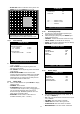
- BLOCK OFF: Select un-detection area by block. Use
MODE key and press ENTER key to set ON.
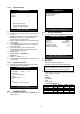
6.3.4 Interval Setup
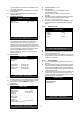
z Set the switching time interval for SEQ or PIP function.
(1 sec. ~ 99 sec.)
- FULL SCREEN: set the sequencing switch time
interval in live full screen.
- PIP SCREEN: set the sequencing switch time interval
of PIP window.
- EVENT UPDATE TIME: Set the minimum time
interval of event to be listed in EVENT LIST. If EVENT
UPDATE TIME is set at 20 sec, only following event
happened 20 sec or more than 20 sec later previous
event shall be listed in EVENT LIST.
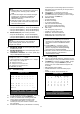
6.3.5 Alarm Setup
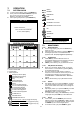
z Select ALARM SETUP and press ENTER to display
following screen.
- CHANNEL: Select camera.
- ALARM INPUT: Select type of alarm sensor input
connected to DVR unit (N.O or N.C). Use [-] [+] key to
set. N.O represents Normal Open type and N.C
Normal Close type. DISABLE represents not to use
alarm sensor connected to DVR.
- DURATION: Set the duration of alarm when an
ALARM is activated. (0 sec. ~ 300 sec.)
6.3.6 Event Popup Setup
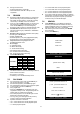
z This Menu is to setup the images captured by the
Event displayed in Full Screen.
z Select Event popup setup and press ENTER key to
display following screen.
- CHANNEL: To select the camera number for Popup.
- POPUP ON/OFF: To decide the use of Popup.
- EVENT: To select Popup Events(A: Alarm, M: Motion)
- DURATION: To select Popup time.
6.3.7 Buzzer Setup
z Set parameters for buzzer (On or Off). Use ▲ ▼
◀
▶
keys and ENTER key.
- ALL: User can set all buzzers at On/Off at once by set
ALL at ON/OFF.
- KEY BEEP: buzz when button is pressed.
- VIDEO LOSS: buzz when video signal is lost.
- ALARM ACTIVE: buzz when alarm is activated.
- MOTION DETECT: buzz when motion is detected.
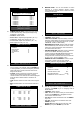
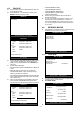
Highlighted Area: Motion Detection Area.
Non-highlighted Area: No Motion Detection Area.
INTERVAL SETUP
SWICHING INTERVAL
FULL SCREEN 01 SEC
PIP SCREEN 01 SEC
EVENT RECORD
EVENT UPDATE TIME 600 SEC
SELECT : ▲▼
,
CHANE VALUE : + -
A
LARM SETUP
CHANNEL CH01
ALARM INPUT N.O
DURATION 005
N.O .............. NORMAL OPEN
N.C .............. NORMAL CLOSE
- - - .............. DISABLE
SELECT : ▲▼
,
CHANE VALUE : + -
BUZZER SETUP
ALL - - -
KEY BEEP ON
VIDEO LOSS ON
ALARM ACTIVE ON
MOTION DETECT OFF
SELECT : ▲▼
,
&
[
ENTER
]
EVENT POPUP SETUP
CHANNEL CH01
POPUP ON/OFF ON
EVENT AM
DURATION 03
SELECT : ▲▼
,
&
[
ENTER
]