
User`s manual


11
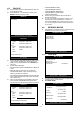
z CAMERA COLOR STUP: Adjust image color. Move
to each element using
▲▼ keys and adjust using
[-] [+] keys or Jog shuttle.
- CHANNEL: Select camera.
- BRIGHTNESS: Adjust image brightness (-32~ 31).
- CONTRAST: Adjust color contrast (-32 ~ 31).
- SATURATION: Adjust color saturation (-32 ~ 31).
- HUE: Adjust color hue (-32 ~ 31)
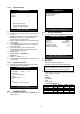
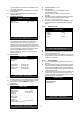
z CAMERA ACTIVE SETUP: With ▲▼
◀▶ keys,
move to option to be changed, and press ENTER key
to select [ON/OFF]. If it is set at LIVE [OFF] and REC
[ON], DVR system records, but does not show live
image of set channel.
- STATUS: Shows if image from a specific channel is
coming for live display and recording. In normal
camera condition, it is ACTIVE, but LOSS is displayed
when the cable is disconnected or camera is not
working.
- LIVE: Decides whether to show LIVE screen image or
not.
- REC: Decides whether to record relevant channel or
not.
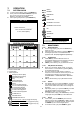
z MOTION SETUP: You can set sensitive of motion
detection in 4 steps, detection window number,
motion detection area and others in relation to motion
recording in this menu.
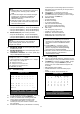
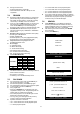
z MOTION CONFIGURATION
- CHANNEL: Select camera.
- SENSITIVITY GRADE: Adjusts sensitivity of motion
detection. Latest setting of a channel changes the rest
of channels to be one and same all at once. (1:LOW,
2:MEDIUM, 3:HIGH, 4:VERY HIGH)
- MOTION DISPLAY TYPE: Showing cells with motion
detected differently from cells with no motion. Latest
setting of a channel changes the rest of channels to
be one and same all at once .
- RECORD DURATION: Whenever motion is detected
and it is set at Motion Recording mode, DVR
system records for RECORD DURATION from time
motion is detected. Latest setting of a channel
changes the rest of channels to be one and same all
at once. (1sec.~ 99 sec.) (Default: 5 sec.)
- NUMBER OF CELLS TO DETECT: This is to adjust
the number of motion cells per each channel
separately within the range of detection (01~ 16).
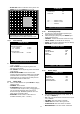
z MOTION MASK SETUP: Set motion detection area.
z ▲▼
◀▶ keys are for moving and ENTER key is for
selection, and MODE key is for changing mode of
MASK SETUP.
- CHANNEL: Select camera.
- CELL: Move to the location which you want to detect
and then press ENTER key. Highlighted cell area
means motion detection area.
- ALL ON: Set all cells as detection area. Use ENTER
key to set.
- ALL OFF: Set all cells as no-detection area. Use
ENTER key to set.
- BLOCK ON: Select detection area by block. Use
MODE key and press ENTER key to set ON.
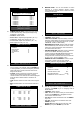
CAMERA TITLE
CAMERA01 CAM -1
CAMERA02 CAM -2
CAMERA03 CAM -3
CAMERA04 CAM -4
CAMERA05 CAM -5
CAMERA06 CAM -6
CAMERA07 CAM -7
CAMERA08 CAM -8
[ENTER] : SELECT MODE
[ ▲/▼ ] SELECT CAMERA
0123456789 ABCDEFGHIJKLMNOPQ
RSTUVWXYZ!#-
[
]
*+-
,
./:<=>?@ ◀▶
CAMERA COLOR SETUP
CHANNEL 1
BRIGHTNESS +0
CONTRAST +0
SATURATION +0
HUE +0
SELECT : ▲▼
,
CHANE VALUE : + -
CAMERA ACTIVE SETUP
CH STATUS LIVE REC
---------------------------------------------------------
01 LOSS ON OFF
02 LOSS ON ON
03 LOSS ON ON
14 ACTIVE ON ON
15 LOSS ON OFF
16 LOSS ON ON
SELECT : ▲▼ ◀▶
,
&
[
ENTER
]
MOTION SETUP
MOTION CONFIGURATION
MOTION MASK SETUP
SELECT : ▲▼
,
&
[
ENTER
]
MOTION CONFIGURATION
CHANNEL 01
SENSITIVITY GRADE 4
MOTION DISPLAY TYPE OFF
RECORD DURATION 05 SEC
NUMBER OF CELLS TO DETECT 16
SELECT : ▲▼
,
CHANGE VALUE : + -