
User guide





12
Chapter 2, Connecting External Devices to Matrox Convert DVI
Connecting Convert DVI for programming
stand-alone mode
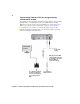
To program your Convert DVI for stand-alone mode, it must be connected using
the USB cable to a computer that has the Convert DVI software installed.
Although you can also use the connections illustrated in “Connecting Convert
DVI to your computer’s primary DVI output” on page 8, and “Connecting
Convert DVI to your computer’s secondary DVI output” on page 10, the
illustration below shows the minimum connection that’s required to program
your Convert DVI for stand-alone mode.
Primary DVI
monitor
To c o m p u t e r ’s d i s p l a y
card (not required if
you are using a laptop
to program Convert
DVI).
Only the Convert DVI
cable’s USB connection
is required to program
Convert DVI for
stand-alone mode.
To AC wall
outlet
To c o m p ut e r ’ s
USB connector