
User guide





9
Connecting Convert DVI
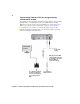
6 Connect the female stereo audio jack on the computer end of the Convert
DVI cable to your speakers. You can also connect your speakers to Convert
DVI’s RCA audio outputs if you have the proper adapter.
7 Connect the DVI connector on your DVI monitor to the DVI OUT on
Convert DVI. If your DVI monitor is black when you start Windows, see “If
you have display issues when starting Windows” on page 25 for more
information.
¦NoteIf your monitor has an HDMI or DisplayPort output, you can use a
third-party HDMI to DVI or DisplayPort to DVI adapter.
Convert DVI connected to primary DVI output
To AC wall
outlet
To s p e a ke r s
Computer
Primary monitor
and Convert DVI
desktop
23
4 5
6
7 0
1
May require an adapter
(see “Using DVI to HDMI
and DVI to DisplayPort
adapters” on page 7)
May require an adapter
(see “Using DVI to HDMI
and DVI to DisplayPort
adapters” on page 7)