
User guide




32
Chapter 4, Configuring Matrox Convert DVI
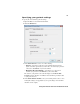
Specifying your administrator settings
The Admin page of the Convert DVI Control Panel is used to control the more
advanced Convert DVI settings. You should use extra care when adjusting the
settings in this area.
°To specify the Convert DVI’s administrator settings:
1 Open the Matrox Convert DVI Control Panel.
2 Click the Admin tab.
3 Under Project Presets, you can save your own custom Convert DVI settings
for future use. Click
Load Project to load a previously saved project preset
that has the settings you want to apply, or click
Save Project to save the
current Convert DVI settings as a project preset.
4 Under Stand-alone Mode, click Program Current Settings to copy the
currently applied control panel settings to the Convert DVI’s internal
memory. Make sure to click
Apply on any of the Convert DVI Control Panel
pages where you made changes before programming to stand-alone mode.
Your Convert DVI’s stand-alone mode status will be displayed as
No
programmed settings
if there are no settings currently in the Convert