
User guide




29
Using the Matrox Convert DVI Control Panel
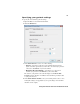
Specifying your region of interest settings
The region of interest feature allows you to output a specific area of your Convert
DVI’s desktop, instead of the entire desktop. A customizable shaded window is
used to select the area of your Convert DVI desktop that you want to output.
¦NoteAlthough the selection window changes dynamically whenever you
modify the settings described in this section, you must click
Apply for your
changes to appear in your video output.
°To specify the Convert DVI’s region of interest settings:
1 Open the Matrox Convert DVI Control Panel.
2 Click the Region of Interest tab.
3 Select Enable Region of Interest to use the region of interest presets and
settings.
4 Under Region of Interest Preset, you can select one of the available
presets from the list to display a region with predetermined settings.
$ Select NTSC 4:3, NTSC 16:9, PAL 4:3, PAL 16:9, 1280×720, or
1920×1080 to display a rectangle of a specific size based on the Convert
DVI’s supported output formats. These presets are hardcoded and cannot