
User guide




25
Using the Matrox Convert DVI Control Panel
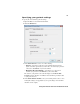
Specifying your general settings
To specify the Convert DVI’s general settings:
1 Open the Matrox Convert DVI Control Panel.
2 Click the General tab.
3 From the Analog Output Type list, select the type of analog video output
you want. You can select either
Component or Composite and S-Video.
4 From the Output Desktop as list, select the video format you want for the
Convert DVI’s video output. If the resolution of your Convert DVI desktop
doesn’t match your selected video output format, the video output will be
displayed according to your selected conversion or scaling setting (see steps
5 and 6).
¦NoteThe SDI output follows the SMPTE 259M specification for SD-SDI
video, or the SMPTE 292M specification for HD-SDI video.
$ The Anti-flicker filter option is enabled by default to prevent flickering
when previewing interlaced video. You may want to clear this option
when working with graphics files, or when displaying full-screen video.