
Users Manual Part 2






Full Color Card Printer
52
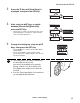
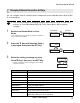
2 Press the Key until [Card Setup] is
dis
played, then press the SET Key.
3 Press the Key until [Eject Face] is
dis
played, then press the SET Key.
4 Change the settings by using the /
Keys, then press the SET Key.
• Settings values that can be changed are as below.
Note
The factory default setting is [NOT SPECIFY].
Printer Info.
SET:>>
Printer Info.
SET:>>
Card Setup
SET:>>
Card Setup
SET:>>
Card Type Card Type
SET
Eject Face
NOT SPECIFY
Eject Face
NOT SPECIFY
Card Type Card Type
SET
Eject Face
NOT SPECIFY
Eject Face
NOT SPECIFY
Eject Face
NOT SPECIFY
Eject Face
NOT SPECIFY
Eject Face
UP
Eject Face
UP
Eject Face
DOWN
Eject Face
DOWN
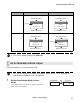
Settings Value Details
NOT SPECIFY The rear surface of cards to output cannot be set. Depending on the
details of printing, the orientation that will print the most quickly is
automatically selected. The front face of the card faces down for single-
sided printing, and faces up for double-sided printing.
UP The card is output with its front surface upwards.
DOWN The card is output with its front surface downwards.
Operating Manual MC660
Matica Technologies