
Users Manual Part 2






49
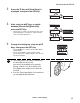
2 Press the Key until [Card Setup] is
dis
played, then press the SET Key.
3 After using the / Keys to switch
between [Normal Exit]/[Error Exit],
press the SET Key.
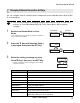
• Select where to output correctly printed cards on the
[N
ormal Exit] menu, and where to output abnormal
cards on the [Error Exit] menu.
4 Change the settings by using the /
Keys, then press the SET Key.
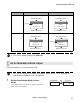
• Use the / Keys to switch between [LEFT SIDE]/
[RIGHT
SIDE].
•
Set it to [LEFT SIDE] to output cards from
Card
Ejection Slot (Left), or [RIGHT SIDE] to do from Card
Ejection Slot (Righ
t
).
Note
The Card Stacker can only be attached to
the Card Ejection Slot (Left).
Note that if the destination for normally
printed cards is set to the Card Ejection
Slot (Right), then output cards cannot be
stacked.
See the "Easy Setup Guide" for instructions
on attaching the Card Stacker.
Printer Info.
SET:>>
Printer Info.
SET:>>
Card Setup
SET:>>
Card Setup
SET:>>
Card Type Card Type
SET
Card Type
Normal Exit
LEFT SIDE
Error Exit
RIGHT SIDE
SET
Normal Exit
LEFT SIDE
SET
Error Exit
RIGHT SIDE
Normal Exit
LEFT SIDE
Normal Exit
LEFT SIDE
Normal Exit
RIGHT SIDE
Normal Exit
RIGHT SIDE
Operating Manual MC660
Matica Technologies