
Installation Guide




Because of the fixed fly design, a certain amount of calculation can be required when decoding or encoding. Master Lock
also offers a software program that will do the calculations for you at:
http://www.masterlock.com/combocalc.msi
This software has been tested on Windows
®
XP and Vista
®
and runs correctly. It may be compatible with some earlier
versions of Windows
®
but has not been tested. To complete the software installation, you must have the free Microsoft
program ‘.net framework’ installed.
The following instructions also are included in a help file in the software.
11
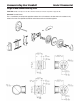
Use a 1/16" hex wrench to
remove thumb turn
Remove inside trim and
dismount lock from door
Loosen two screws and remove
baffle plate from dial assembly
Lift cam and remove from
cylinder tailpiece
Loosen the two dial ring/
cylinder mounting screws
Remove dial ring with disrupter
spring
Remove the wave washer and
the dual fence ring
GENTLY lift dial ring from
cylinder
Remove a spacer washer and
disk 3; DO NOT disturb disk 1
Remove a spacer washer and
disk 2; DO NOT disturb disk 1
A groove is cast into the interior of the dial ring. Determine the
number aligned with that groove and record it in the ‘Set to
Disk 1’ column of the worksheet
Deadbolt Information (continued) Grade 2 Residential
Decode
CyliNDeR mOuNtiNg SCRewS