
User manual


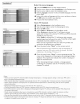


settino Clock
Setup Clock
_nfo
Mcst TVchannels do not transmit clock
information, A few cable channds do,but they
areat the end of the channel ring, Antenna
channds do net transmit clock information.
If clock information does not appear, you can
assume that either dock extraction is taking a
long time or that there is no dock.
This allows you to use your TV as a clock.
Note: Adjusting the clock is necessary for the correct operation of Lock after
(See TV settings, Channels, p. 24) features.
Auto clock mode
0 Select Clod_ in the Setup menu.
0 Press the cursor right key to select the Auto clock mode.
@ Press the cursor right key to instruct the TV to get the time
automatically or manually.
Auto clock channel _ly availablewhenAutoclod<mode is_t to Automa_c)
With the cursor buttons, select the channel number where time
can be found by the TV. Typically time can be found on PBS as well
as some other channels.
Note: If #4anual has been selected in the Auto dock mode, the Auto
dock channel menu item can not be selected.
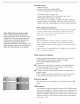
Time - Day (only available when Auto dock mode is _t to Manual)
With the cursor buttons, select and enter the correct time and
day. If Auto clock mode Manual has been selected, and no clock
search has been done, the system will keep the entered time and
day.
Time zone ('onlyavailable whenAuto clock mode is set to Automatic)
0
0
This function allows you to select your local time zone.
Broadcasted time information will correct the clock display for
your local time.
Select Time zone with the cursor down.
Press the cursor right to select your local time zone.
Daylight saving (only available when Auto dock mode is set to Automatic)
Daylight saving time is automatically set by spedally
broadcasted signals. This menu item allows you to disable the
automatic setting of daylight saving rime. This is useful if you live
in an area or state where daylight saving is not applied, but you
receive channels from other areas where daylight saving signals are
broadcasted.
0 Select Daylight saving with the cursor down.
0 Press the cursor nght key to select Automatic for automatic
clock correction for daylight saving time, based on specially broad-
casted signals.
0 Select Offto disable automatic clock correction based on the spe-
cially broadcasted signals.
19