
Specifications





53
6. Move to the next point you want to log.
7. Resume steps 3 through 6 as many times as necessary.
8. When all points have been logged, tap DONE on the
screen. This closes the open log file, which now contains
the positions of all the logged points, and takes you back
to the last displayed navigation screen.
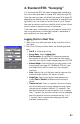
Logging Trajectories in Real Time
1. Walk to the start point of the trajectory and stand still on
that point.
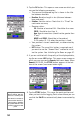
2. Press the LOG key and then enter the following parame-
ters:
• Site ID: A 4-character string.
• Survey Mode: Select Kinematic.
• Site Description: An optional 20-character narrative
description of the point. Tap inside the field, enter
your text from the on-screen keypad and press ENTER.
• Antenna Height: Enter the height you measured in the
setup phase (see page 41). ProMark3 RTK will save
and indefinitely use this value until you change it
manually.
• Units: Specify the unit that was used to measure the
antenna height (meters, US feet or Int feet).
• Height Type: Specify the type of measurement you
made (Slant or Vertical) to determine the antenna
height.
• Interval Type: Time or Distance, according to whether you
want the points of the trajectory to be created and
logged at regular intervals of time or distance.
• Interval: Time elapsed, in seconds, or distance traveled,
in meters, between any two point positions logged
along the trajectory followed.