
Specifications





51
4. Standard RTK: “Surveying”
It is assumed that RTK has been implemented according to
the instructions provided in chapter RTK Setup on page 34.
Once the rover has been initialized (see page 42 or page 49,
depending on whether you are in base/rover or rover-only con-
figuration), you can move on to the survey as such. Always
take care to maintain maximum satellite visibility from the an-
tenna in order to preserve system initialization.
If the rover loses initialization, you will need to resume this
step using whichever initialization method is preferable in
your context of use (see
page 35).
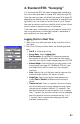
Logging Points in Real Time
1. Walk to the first point you want to log and stand still on
that point.
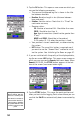
2. Press the LOG key and then enter the following parame-
ters:
• Site ID: A 4-character string.
• Survey Mode: Select Logging Point.
• Site Description: An optional 20-character narrative
description of the point. Tap inside the field, enter
your text from the on-screen keypad and press ENTER.
• Antenna Height: Enter the height you measured in the
setup phase (see
page 41). ProMark3 RTK will save
and indefinitely use this value until you change it
manually.
• Units: Specify the unit that was used to measure the
antenna height (meters, US feet or Int feet).
• Height Type: Specify the type of measurement you
made (Slant or Vertical) to determine the antenna
height.
• Time on site (sec): Time, in seconds, that must elapse,
with the antenna not moving, before the rover stores
the position of the point (default: 15 seconds). You
decide the duration of the occupation (If it is greater
than 1
second, the position solutions will be averaged
over this period of time to improve accuracy. If it is
1 second, there is no position averaging but work
proceeds more quickly).