
Specifications




261
18.Appendices
Main Alarm Screens
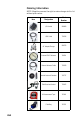
Alarm message Description & Action Required
(Surveying only)
You are trying to start data collection with no exter-
nal antenna connected to the unit. Please connect
the external antenna using the appropriate cable
and resume data collection.
The internal battery is low and the unit will very
shortly be unable to function properly. Please
acknowledge the alarm, quit the current applica-
tion, turn off the unit and replace the battery before
doing anything else.
The internal memory or SD card you are using for
data collection is almost full. Do one of the follow-
ing: 1) If possible, free some memory space using
the File Manager command, 2) Switch to the other
possible medium using the Setup>Storage com-
mand or 3) Replace the SD card if you work exclu-
sively with SD cards.
You were using the AC adapter as the power
source for the unit and you have just unplugged it.
The unit is now powered from its internal battery.
Just acknowledge the alarm.
If you are not collecting data, the unit warns you
that it would be unable to collect data at your cur-
rent location due to poor GPS reception conditions:
Move to a better location.
If a survey is in progress (Stop & Go or Kinematic
without initialization or –less likely– Static), the unit
warns you that it has stopped collecting data until
the reception conditions improve.
You are performing a stop-and-go or kinematic sur-
vey that you initialized with the initializer bar or at a
known point. Poor reception conditions have trig-
gered this message. Whether these conditions are
intermittent or persistent, you must now acknowl-
edge this message and resume all or part of the
survey (see Re-Initialization on page 118).
Alarm Acknowledge:
Tap anywhere on the
screen outside of the alarm
window to acknowledge
(erase) the alarm message.
The “Not enough satel-
lites...” and “No external
antenna...” messages will
also automatically disap-
pear when the condition
that triggered the message
also disappears.