
Specifications






248
LED Indicators
The charge LED will give charging information only if the re-
ceiver is on.
Turning Off ProMark3
Press the red key until the Shutdown window appears. Tap OK
to confirm that you want to turn off the unit. As a result, the
unit instantly shuts down.
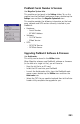
Power LED (Green) Indicates:
Off Device Switched Off
Solid Green Power On
Charge LED (Amber) Indicates:
Off Not charging
Solid Amber Battery is fully charged
Blinking Amber Battery is charging
Power
Charge