
Specifications




235
Map Setup
This option allows you to set the viewing options for the
Map screen.
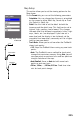
On the Format tab, you can set the following parameters:
- Orientation: You can change how the map is orientated
on the screen to either North Up, Course Up or Track
Up. Default is North Up.
- Detail: Use this field to set the detail for both the
basemap and the detail map. This field can be set to
highest, high, medium, low or lowest. This changes
the zoom level that different map objects (cities, high
-
ways, labels, etc.) are displayed. If you have set a
zoom level and the display is too cluttered, set the
map detail to a lower level; conversely set it to a higher
level to view more detail.
- Track Mode: Allows you to set how often the ProMark3
stores track points:
• Off: Stops the ProMark3 from saving any new track
points.
• Auto: The ProMark3 uses a method for track point
storage that maximizes memory. Using Auto, you will
see more points on and near turns and less points on
straight stretches of the map.
• Auto Detailed: Same as Auto but with more track
points on and near turns.
• 2.0 km, 1.0 km,..., 0.05 km, 0.01 km: Fixed time inter-
vals for track point storage.
Map Setup screen,
Format tab
Fixed Rate
Auto
Auto Detailed