
Specifications





193
- To demand that a remote device be allowed to access the
local services only after pairing itself with ProMark3,
check the Enabled box underneath Authentication. Other
-
wise keep this option disabled (check box cleared).
Caution! This option is automatically disabled every time
you start Bluetooth Manager.
- Tap OK on top of the window for the changes to take
effect.
Local Services
Introduction
The local services offered by ProMark3’s Bluetooth controller
are the following:
• Serial Port Service. The Serial Port service allows you to
exchange data with a remote device via a virtual Bluetooth
serial port.
• File Transfer Service. This service allows any two Blue-
tooth-enabled devices to exchange files.
• Object Push Service. This service is required to run the
File Transfer Service but is not usable as such in
ProMark3.
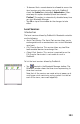
To list the local services offered by ProMark3:
• Tap located in the Bluetooth Manager toolbar. The
Bluetooth window shows the three icons representing its
three local services.
Note that all the services are made active at power up (a
small green circle containing a plug symbol is visible on
each of the icons;
see screen opposite).