
Specifications




115
Data Collection
8. Walk to the start point of the trajectory you want to survey,
making sure you will not mask the antenna.
9. If you have initialized on bar or known point, you may
need to change some of the survey settings (typically you
need to change the antenna height after moving the rover
antenna from the initializer bar to the pole).
In this case, press the LOG key, which here is different
from tapping the on-screen Log button, and then review
and correct if necessary the following parameters:
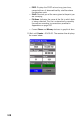
- Antenna Height: After bar initialization, you need to
enter the new height of the rover antenna as it is
now located on top of the pole. After initialization
on known point, you should not have to change this
parameter.
- Initialize: Check that <None> is now selected.
If you have selected <None> as the initialization method,
skip step 9.
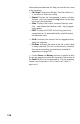
10.Tap the on-screen Log button and then walk along the tra-
jectory. The screen then looks like this:
Make sure the rover
antenna has the best
possible view of the sky at
all times during the
survey. This should result
in #Sats continuously
greater than 4 and PDOP
continuously less than 4.
The Obs. Range field is
irrelevant to the kinematic
mode and for this reason
is left blank.