
Specifications




107
10.While holding the antenna pole stationary above this
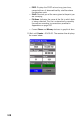
point, tap Log on the screen. The receiver then displays
the screen below.
Information provided here will help you determine when
enough data has been collected.
• Obs. Range (Observation Range): Field left blank as it
is irrelevant to Stop & Go survey.
• Remain: Displays the remaining amount of time during
which you should keep the antenna stationary over the
surveyed point. At the end of the countdown, you can
walk to the next point.
• # Sats: Displays the current number of healthy satel-
lites – seen above the elevation mask – being logged
into memory.
Make sure the rover
antenna has the best
possible view of the sky at
all times during the
survey. This should result
in #Sats continuously
greater than 4 and PDOP
continuously less than 4.
The Obs. Range field is
irrelevant to the Stop & Go
mode and for this reason
is left blank.
You may shorten the static
occupation time (i.e. end
the static occupation time
before Remain =00:00:00)
by tapping the Cancel
button. ProMark3 will then
take you directly to the
next screen on which the
Site ID will have normally
been incremented.