
Specifications






104
• Control Point check box: Displayed only if <None> is
selected in the Initialize field. If you check this box, you
will be able, later on, to use the start point -i.e. the
point where initialization took place- as a control
point.
Initialization Phase
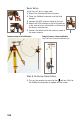
7. Tap the Log button at the bottom of the screen. This starts
data collection which will stop only at the end of the Stop
& Go survey. So be sure from now on, and until the end of
the survey, that you will not mask the antenna.
What happens after starting data collection depends on
the chosen initialization method:
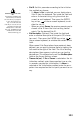
• With Bar or Known selected, the receiver first goes
through an intermediate screen showing the counting-
down of the initialization phase (see screen opposite).
The
Remain field will count down beginning from the
value of the Time on site field set in the Survey Settings
screen. At the end of the countdown sequence, the
Remain field reads “00:00:00”.
If you are performing initialization on known point, you
are now ready to start the stop & Go survey. Continued
in next chapter
Data Collection.
Initialization count-down.