
Specifications






102
Enter the following parameters:
• Site ID and Site Description: Set these two parameters
after choosing the Initialization method (see below
after the
Initialize parameter).
• Antenna Height: Tap inside this field and enter the verti-
cal distance between the antenna and the surveyed
point. Be careful when entering the antenna height as
this field uses a fixed format (xx.xxx). Then press the
ENTER key, or tap
on the on-screen keyboard, to
validate the content of this field.
• Units: Tap inside this field and then tap the unit used
to express the antenna height (meters, US feet or Int
feet)
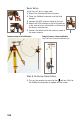
• Height Type: Tap inside this field and then tap the
method used to measure the antenna height: Slant if
you measured the antenna height to the outside edge
of the GPS antenna, or
Vertical if you measured the
antenna height to the bottom of the GPS antenna
mounting thread (see opposite).
• Recording Interval: Tap inside this field and then tap the
recording interval (time in seconds between any two
consecutive acquisitions of GPS data) you wish to use
in your stop & go survey. Make sure the same recording
interval is used at the base and in the rover.
• Initialize: Choose the method to initialize the stop & go
survey (Known, bar or <None>; see page 98).
VerticalSlant