
User guide


■
■
1
Everything you love about multimedia, movies,
music, and photos is brought to you with the
TVisto.
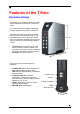
The TVisto features an elegant, fashionable,
and high quality case to protect your device.
The buttons on the front panel of the TVisto
offer quick access to basic functions for the
multimedia player, even without the remote
control. Conveniently located on the top is the
power on/off switch, with following indicative
colours:
• TV mode: blue when power-on and red
when in stand-by mode. It “blinks” (red
intervals) to confirm a command, whenever
a button on the remote control is pressed.
• PC mode: blue when power-on
On the rear panel, there are following
interfaces:
• FireWire 400: IEEE 1394a connection for
data transfer (supports daisy chain)
• USB 2.0: High Speed USB 2.0 connection
for data transfer
• TV Multi-Connector: Analogue
Audio/Video. This multi-pin connector
provides all the video and analogue audio
signals for your TV set.
• SPDIF: Digital audio output for copper
coaxial or optical cable
• Mini DIN Jack: Power supply
Features of the TVisto
Exclusive Design
15.2 cm
4.8 cm
SPDIF
USB 2.0
TV Multi-Connector
FireWire 400
Mini DIN Jack
22.2 cm