
User guide




■
Settings
The TVisto Settings menu is extremely important in order to correctly configure your device
and benefit from its advanced features. In the following paragraphs, there are detailed
descriptions of the various settings and parameters.
Languages
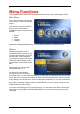
The TVisto provides the unique
feature to support a multilingual
audience. With sophisticated
Unicode character handling, it
supports most of the major
languages used in the menu
selection and the subtitle feature of
movies. Refer to the “Font
Support” paragraph for further
details on how to enable
languages other than English.
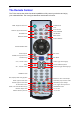
Use the ▲▼ navigation buttons to
select your language and press the
PLAY/ENTER button to activate it. Press the HOME button on your remote control to save
the language setting. Once activated, all the menu selections and wording will switch to the
selected language.
Audio Settings
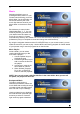
These settings configure the
provided audio output format:
• Analogue for the dual Stereo
audio
• Digital for the optical SPDIF
digital audio (supports
compressed Dolby Digital 5.1
and DTS pass through).
Use the ▲▼ navigation buttons to
select your audio setting and press
the PLAY/ENTER button to activate
it. Press the HOME button on your
remote control to save the audio
setting.
Selecting analogue audio out will output the stereo audio to the L/R RCA jack from your AV
cable.
Selecting digital audio output will provide digital sound through its SPDIF digital audio port. In
this case, you have to connect this port using the SPDIF optical cable to the digital input of
your Dolby Digital or DTS Home Theatre Receiver/Processor in order to take advantage of
the high audio quality.
■
17