
User guide




■
Menu Functions
This paragraph presents the various menus and their functions when operating the TVisto.
Main Menu
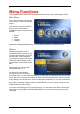
This is the main page that appears
when you turn on the TVisto media
player.
You have four (4) main selections
that you can access with the
navigation buttons and by pressing
ENTER:
• Movies
• Music
• Pictures
• Settings
Please see following paragraphs for a more detailed description of individual menus.
Movies
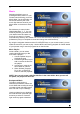
Selecting the Movies menu or
pressing the Movies button on your
remote control will bring you to the
Movies folder. On the right side,
you will see the directory list of the
video clips that are stored in your
Movies folder on the device’s hard
disk.
Each directory is named under
left/right brackets: “[“, “]”.
For example, in the directory
“[XviD]” we have stored various
XviD video clips. You can make any directory you want with your desired name and store any
movie you want in it (use your computer to create and change directories!). Please note that
every directory can contain one or more sub-directories, depending on your own preferences.
By using the navigation buttons and the PLAY/ENTER key on your remote control, you can
select the files you want to play.
If you have more files than can fit on the first page, you can either scroll down to access the
next page or use the NEXT and PREVIOUS buttons on your remote control to jump to the
next page.
■
14