
User guide




■
■
10
The Remote Control
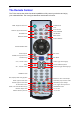
The TVisto remote has all the functional capabilities to fully control your device and enjoy
your multimedia files. The next figure describes each button’s function.
INFO, displays details during playback
ANGLE, view DVD with different angle
POWER On/Off
DVD MENU
HOME, displays the main menu
External SUBTITLE position
ZOOM to image
THUMBNAILS On/Off
ROTATE picture
VOL +, increase volume
VOL -, decrease volume
TV out, toggle video output format
DVD TITLE
PLAY ALL Files
SEARCH for Time or Title/Chapter
NAVIGATION BUTTONS
REPEAT chapter or title
A1, not used
FAST FORWARD
NEXT TRACK
PAUSE/STEP
SLOW forward function
PREVIOUS TRACK
SHUFFLE, play all files randomly
REVERSE PLAY
STOP PLAYBACK
MUTE
REPEAT between points A-B
MUSIC, jumps to Music folder
MOVIES, jumps to Movie folder
NUMERICAL PAD
RETURN, to the previous menu
A2, not used
SETTINGS, jumps to Settings
PICTURES, jumps to Pictures folder
SUBTITLE, toggle subtitle language
AUDIO, toggle audio language
PLAY