
User guide




■
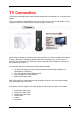
The TVisto offers the option for two kinds of audio connection, analogue and digital. Use the
analogue connection when connected directly to the TV, or if you don’t own a stereo
amplifier. Use the digital connection when you want to listen to digital surround sound on your
home entertainment system.
Analogue Audio Setup
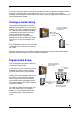
The simplest configuration is when the
analogue audio system on your TV set is
used. In this case, no matter what type of
AV cable you use (the default providing
Composite/S-Video signal, one of the
optional cables providing Video
Component YPbPr, or SCART), the
analogue audio is provided to the stereo
input of your TV by the Left/Right RCA
jacks.
TVisto
S-Video, Composite,
Component YPbPr or
SCART Video
Analogue
L-R Audio
T
V
This configuration uses only one AV cable
connected to the multi-connector port on
the TVisto.
With this simple setup, you can get the highest video quality, but the audio remains stereo
analogue quality provided by the TV set’s built in speakers.
Digital Audio Setup
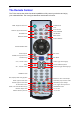
This configuration provides the best mix
of video and audio quality.
Digital Audio Out
5.1 Speake
r
S
y
stem
S-Video, Composite,
Component YPbPr or
SCART Video
(SPDIF)
T
V
In this setup, you can connect any of the
available AV cables except the stereo
L/R RCA jacks to the TV set speakers.
Instead, you use the Digital Audio Port of
the TVisto. Connect this port using the
SPDIF copper coaxial or the optional
optical audio cable to the digital input of
your Dolby Digital or DTS Home Theatre
Receiver/Processor.
Dolby Digital or
DTS Home Theatre
Receiver/Processor
T
Visto
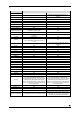
Provided the quality of this receiver and
the correct setup of the 5.1 Speaker
System, you can experience optimum
multimedia quality in both audio and
video.
■
9