
User guide


■
■
7
Safe Removal
In order to safely remove the TVisto from your system, please follow the same procedures as
for any external Plug & Play device.
PC
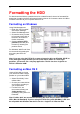
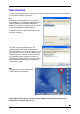
Double click on the taskbar icon to “Unplug or
Eject hardware”. The adjacent dialogue box will
appear, displaying the external Plug & Play
devices. In the current example, you can see the
TVisto as a USB Mass Storage Device.
In order to remove it, click the device in the list
and then click Stop.
Click OK on the next dialogue box. The
operating system will automatically stop the
device and inform you for its safe removal. If you
are using the TVisto (e.g. you are working on
Word document or a picture located in its disk
the operating system will notify you that it is
unable to remove the device. In this case, clos
all the applications affecting or accessing the
TVisto and
a
),
e
try again.
Mac
Drag the drive icon into the trash bin
to eject and remove the drive.
Note: Always follow the safe removal process when disconnecting the device or it
might not be recognised on the TV.