
Specifications


Getting Started with Pro Tools M-Powered22
To select the Sync Source:
1 If Pro Tools is open, close it.
2 In the Applications folder, locate and launch
the M-Audio Control Panel, as follows:
• For FireWire interfaces, launch M-Audio
FW.
• For PCI interfaces, launch M-Audio Delta
Control Panel.
3 Click the Hardware tab.
4 Select a Sync Source.
5 When finished, close the M-Audio Control
Panel.
Configuring I/O Setup
Using the I/O Setup dialog, you can label
Pro Tools input, output, insert, and bus signal
paths. The I/O Setup dialog provides a graphical
representation of the inputs, outputs, and signal
routing of the M-Audio interface.
Pro Tools M-Powered has default I/O Setup set-
tings that will get you started. Use the I/O Setup
dialog only if you want to rename the default
I/O paths.
To rename I/O paths in I/O Setup:
1 Choose Setups > I/O Setups.
2 Click the Input, Output, Insert, or Bus tab to
display the corresponding connections.
3 To change the name of a path or subpath,
double-click directly on the Path Name, type a
new name for the path, and press Return.
4 Click OK.
Hard Drive Configuration and
Maintenance
It is recommended that you start with a newly
initialized audio drive. You should also periodi-
cally defragment your audio drive to ensure
continued system performance.
If you are using an ATA/IDE or FireWire hard
drive, initialize your drive with the utility
named Disk Utility included with your Apple
System software.
Your digital input device must be connected
and turned on. If your input device is not
turned on, leave the Sync Source set to Inter-
nal.
For more information on selecting the Sync
Source for your M-Audio interface, refer to
your M-Audio interface documentation.
Pro Tools M-Powered bypasses the M-Audio
mixer that is displayed in the M-Audio Con-
trol Panel. The interface’s hardware inputs
and outputs show up directly in Pro Tools
I/O Setup.
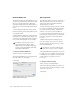
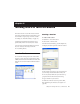
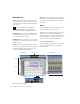
I/O Setup dialog for Pro Tools M-Powered
(M-Audio FireWire 1814 shown)
Refer to the Pro Tools Reference Guide for
more information on renaming I/O paths.