
Specifications


Getting Started with Pro Tools M-Powered20
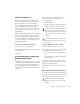
Hardware Buffer Size
The Hardware Buffer Size (H/W Buffer Size) con-
trols the size of the hardware cache used to han-
dle host processing tasks such as Real-Time
AudioSuite (RTAS) plug-ins. he H/W Buffer set-
ting can also be used to manage monitoring la-
tency.
◆ Lower Hardware Buffer Size settings reduce
monitoring latency, and are useful when you are
recording live input.
◆ Higher Hardware Buffer Size settings allow for
more audio processing and effects, and are use-
ful when you are using larger mixer configura-
tions or more RTAS plug-ins on your system.
To change the Hardware Buffer Size:
1 Choose Setups > Playback Engine.
2 From the H/W Buffer Size pop-up menu, select
the audio buffer size, in samples.
3 Click OK.
CPU Usage Limit
The CPU Usage Limit controls the percentage of
CPU resources allocated to Pro Tools host pro-
cessing tasks such as Real-Time AudioSuite
(RTAS) plug-ins, as follows:
◆ Lower CPU usage settings reduce how much
Pro Tools processing affects other CPU-intensive
tasks (such as screen redraws), and limit the
amount of processor resources available for
Pro Tools tasks. They are useful when you are ex-
periencing slow system response, or when run-
ning other applications at the same time as
Pro Tools.
◆ Higher CPU Usage Limit settings allocate
more processing power to Pro Tools, and are
useful for playing back large sessions or using
more real-time plug-ins.
◆ The maximum CPU Usage Limit is 85 percent
for single-processor computers, and 99 percent
for multi-processor computers. (The 99 percent
setting dedicates one entire processor to
Pro Tools.)
To change the CPU Usage Limit:
1 Choose Setups > Playback Engine.
2 From the CPU Usage Limit pop-up menu, se-
lect the percentage of CPU processing you want
to allocate to Pro Tools.
3 Click OK.
In addition to causing slower screen re-
sponse and monitoring latency, higher
Hardware Buffer Size settings can affect the
accuracy of plug-in automation, mute data,
and timing for MIDI tracks.
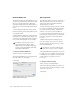
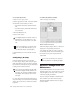
Playback Engine dialog for Pro Tools M-Powered
(M-Audio FireWire 1814 shown)
Increasing the CPU Usage Limit may slow
down screen response on slower computers.