
Use and Care Manual






OWNER'S MANUAL14
Remote Control Pairing
OVERVIEW
The original remote that comes in the box is already paired to
the base. No further action is required.
In the event that the remote is not paired with the base (as in the
case of a replacement remote), begin by checking the following:
STEP 2
On the control box (underside of base), press
the PAIR button twice. The LED light on the
control box turns blue.
STEP 3
On the remote control, press and hold the
and starts the pairing process.
If the pairing is successful, the LED light on
the control box turns to green. If pairing fails,
the LED light on the control box turns off.
Repeat the steps until pairing is successful.
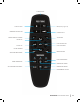
Remote buttons highlighted
STEP 1
Ensure the remote batteries are functioning. Replace if necessary.