
Owner's Manual

47
Viewing your camera remotely using Skype™
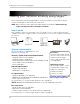
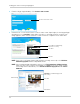
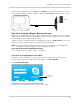
2 Connect the mini-USB cable (included) from the USB port on your video monitor or receiver
to an available USB port on your computer. "USB PC CAMERA MODE" appears on the screen.
mini-USB cable
USB port
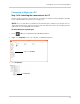
Step 3 of 6: Creating a Skype / Microsoft account
A Skype account allows you to connect to your camera through the Skype service. You may also
login to Skype using a Microsoft e-mail address. Skype is a service that allows users to make
voice and video calls to anywhere in the world.
In order to connect to your video monitor using Skype, you will need two accoun
ts—one for the
camera (e.g., Lorex Camera) and one for yourself (e.g., Tom Smith).
NOTE: The Skype illust
rations and instructions below serve as a guideline only. Skype may
change their website / product interface without prior notice.
If you do not have an existing Skype account:
See “If you do not have a Skype account...” on page 51.
If you have an existing Skype account (Mac):
You have to create a separate account for your camera. Follow the instructions below.
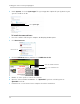
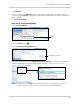
1 Launch Skype. If
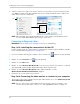
you are already connected to Skype, click File>Sign Out.
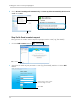
2 Click Cr
eate New Account.
Create New
Account
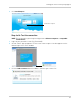
3 Follow the on-screen instructions to create a new account.