
Owner's Manual

38
Viewing your camera remotely using Skype™
Viewing your camera remotely using Skype™
Connecting to your system through Skype is a convenient and free* method to view your
camera from anywhere with an Internet connection.
NOTE: When remotel
y connecting to your video monitor using Skype, audio monitoring,
audio recording, and video recording are disabled.
How it works
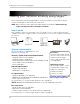
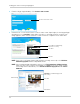
Your computer connects to the Skype server. The Skype server is connected to your home
computer. Your home computer connects to the wireless receiver, which captures video from
the camera.
Skype server
Home computer
System requirements
For the latest device compatibility list, visit
www.lorextechnology.com
Disclaimers
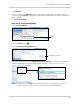
You must have a high-speed
internet connection to use the
video function on Skype.
Traffic congestion may result
in choppy video.
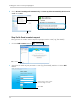
Mobile Data Charges
When using a mobile cellular
network, data charges may
apply. Check with your
provider for details.
*Computer to computer
For Skype related support, visit
https://support.skype.com/
.
iPhone®, iPad®, iPod Touch® Requirements
•
Skype
for iPhone v. 3.0 and above.
•
Skype
for iPad v. 3.5 and above.
• iPhone 5/4S/4/3GS, iPad (1st generation and above), iPod
touch (3rd generation and above).
• iOS 4.0 and above.
Android Requirements
•
Skype
v. 2.8 and above.
• Android™ v. 2.3 and above.
PC requirements
•
Skype
for Windows v. 4.2 and above.
• Windows XP SP3/Windows Vista/Windows 7/Windows 8.
• 1 Ghz or greater processor.
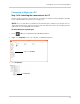
For instructions, see “Connecting to Skype on a PC” on page 39.
NOTE: Windows RT and Windows phone devices are not supported at this time.
Mac requirements
• Skype for Mac OS v. 5.3 and above.
•
Mac
OS® v. 10.5.8 and above.
• 1 GHz or higher Intel processor (PowerPC™ not supported).
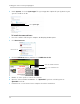
For instructions, see “Connecting to Skype on a Mac” on page 46.