
Owner's Manual




Live video from the camera is immediately
shown on the monitor once the camera is
successfully paired.
Disabling Channels (On / Off)
Use the On / Off menu if you need to disable
empty channels so they do not appear on the
monitor when changing channels manually or
using Sequence Mode. You only need to do this if
you have moved a camera to a different channel
using the pairing function.
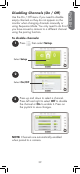
To disable channels:
1
Press , then select Setup.
Select Setup
2
Select On/Off
3
Press up and down to select a channel.
Press left and right to select Off to disable
the channel or On to enable it. Press on
the joystick to save changes.
NOTE: Channels are automatically enabled
when paired to a camera.
ENGLISH
39