Owner's Manual
Manuals
Brands
Lorex Manuals
Cameras
Lorex Wi-Fi Wireless Home Monitor
31
32
33
34
35
36
37
38
39
40
1
Press
, then select
Settings
.
Select
Settings
T
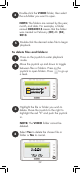
o configure audio / video out:
NOTE:
Only required if viewing on a P
AL
television set.
3
Select
NTSC
(North America) or
PA
L
(UK/Europe) and by pushing the joystick.
2
Select
Audio
/ Video
Output
36
1
...
...
36
37
38
39
40
...
...
140