
Owner's Manual




Press on the joystick to enter playback
mode.
1
To delete files and folders:
Select Yes to delete the chosen file or
folder or No to cancel.
4
Delete?
Yes No
Move the joystick up and down to toggle
between files or folders. Press on the
joystick to open folders. Press
to go up
a level.
2
05082013
05092013
X
Highlight the file or folder you wish to
delete. Move the joystick to the right to
highlight the red “X“ and push the joystick
in.
NOTE: The VIDEO folder cannot be
deleted.
3
4
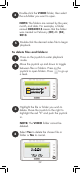
Double-click the VIDEO folder, then select
the sub-folder you want to open.
NOTE: The folders are named by the year,
month, and date. For example, a folder
named 02042013 means that the folder
was created on February (02) 4th (04),
2013.
5
Double-click the desired video file to begin
playback.
32