
Owner's Manual




Selecting Quad or Single-Channel
Motion Recording Mode
Setting the Motion Recording Mode determines
how the handheld monitor will record during
Auto Recording.
NOTE: This setting is only used when the monitor
is in Quad Mode.
To select Motion Recording Mode:
1
Press , then select Recording.
Select
Recording
Select Motion
Recording
Settings
2
Select Mode
3
4
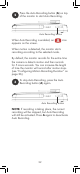
Select Quad Channel or Single
Channel and press on the joystick to
confirm.
Select Quad Channel for the monitor to
record the whole screen when motion
recording starts in Quad Mode.
28