
Owner's Manual






63
Setting up your DVR for Remote Connectivity
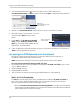
6 Fill in the warranty registration form with your product and purchase details. Check the
sticker underneath your DVR for the Product Model Number and Serial Number. Click Save
Warranty.
Select your address or
enter a new address
Enter your product and
purchase details
Click Save Warranty
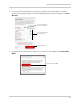
7 A page pops up to prompt you to register your product for Lorex DDNS. Click Set Up a New
DDNS.
Click Set Up a New DDNS