
Owner's Manual






62
Setting up your DVR for Remote Connectivity
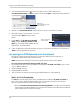
3 Click Warranties to register your product for warranty.
Click Warranties
NOTE: Warranty registration is required to register for DDNS.
4 The Warranty page opens. Click A
ctivate Warranty to register your product for warranty.
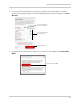
5 Under Your
Address, select an address or click Enter a New Address to create a new address.
Fill in your address information and click Create Address.
Enter your address
information
Click Create Address