
Owner's Manual






59
Setting up your DVR for Remote Connectivity
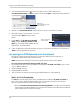
• If you are connecting using Internet Explorer 9 or 10, the attention bar appears on the bottom
of the screen. Click Allow to install the plug-in.
Attention Bar in Internet Explorer 9
Click Allow
4 Under User Name and Password, enter the DVR’s username and password. By default, the
username is admin and the password is left blank.
5 Cl
ick Login to
log into the system.
NOTE: If you are having difficulty logging into your system using Internet Explorer, it is
r
ecommended to use the Client Software provided on the CD or as a free download from
www.lorextechnology.com. For instructions, see “Lorex Client 11: Client Software for
PC” on page 67.
To connect to the DVR’s local IP address on a Mac:
1 Open Safari.
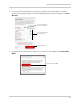
2 Enter http://, the IP a
ddress of the DVR, colon, and the HTTP port number of the DVR (e.g.
http://192.168.5.118:80) into the address bar. You must include the HTTP port number of the
DVR after the address. A page appears to prompt you to install a plug-in.
Local DVR IP
HTTP Port number
Colon
http://
Example (Connecting to a Local IP Address using Safari):
3 Click Download to download the plug-in for Safari.
Click Download