
Owner's Manual




104
Mobile Apps: Accessing your DVR Using a Mobile Device
• Port:
Auto Connect check box
Enter the DVR’s Mobile Port number (by default, port 1025).
4 Select the Auto Connect checkbo
x and then click Ok.
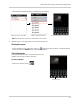
5 From the Server window, select the DVR account you created. Click OK
to connect to the DVR.
Select the name of your DVR