
Owner's Manual






19
Controlling the PTZ Camera with your DVR
English
4.3 PTZ PRESETS AND PTZ CRUISE
Using the DVR, you can create presets. Presets allow you to save
different positions of the camera, so you can return the camera to these
positions without using the manual controls.
A PTZ cruise (referred to on some DVR’s as a tour or scan), allows you to
configure a sequence of presets that the camera will automatically cycle
through. This is useful if you want the camera to monitor a large area,
without manually having to control the camera.
NOTE: These features may not be available on all DVR’s. Check your DVR
instruction manual for details.
4.4 SETTING PTZ PRESETS ON THE ECO2 DVR
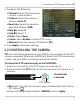
1. Using the direction keys, zoom, focus, and iris settings, move the
camera into position.
2. (Optional) In the Tim
e field, sel
ect the number of seconds the camera
will remain in that position during PTZ cruise before going to the next
position.
3. Click Set to set the pr
eset. The Total and No. field will automatically
increase. The Total field shows you the total number of created
presets, and the No. field shows you the number of the preset you are
currently creating.
Save Presets
Clear Preset
Set Preset
Go To Preset
Total Number of
presets
Preset number
Time shown before
changing in Cruise