
Owner's Manual






18
Controlling the PTZ Camera with your DVR
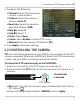
3. Use the on-screen PTZ controls to control the camera.
Channel:
Select the channel
with the PTZ camera
Click + / - to adjust the
camera Zoom, Focus,
and Iris settings
Direction keys:
Click to pan and tilt
the camera
Speed Slider:
Increase or decrease the pan and tilt speed
Camera Pre-set
controls (see page 19)
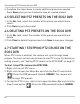
ATTENTION: This PTZ camera is designed tilt up and down within a
range of 155°. Tilting less than 10° or greater than 165° away from the
camera base may cause the image to become slightly unclear.
10°
165°
180°
0°
Optimal Viewing Range
If this happens, use the DVR
controls to tilt the camera
between 10° and 165°. The
camera’s tilt angle appears on
the monitor when it moves.
339/15/x5/S
Pan angle
Tilt angle
Zoom level