
Owner's Manual






17
Controlling the PTZ Camera with your DVR
English
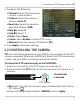
4. Configure the following:
• Channel: Select the channel the
camera is connected to.
• Pr
otocol: Select the protocol
(def
ault: Pelco-D).
• Baud rate: Sel
ect the camera’s
baud rate (default: 2400).
• Data Bit: Select 8.
•
Stop Bit: Select 1.
•
Parity: Sel
ect None.
• Cruise: Sele
ct Enable to enable PTZ cruise.
• Address: Ent
er the camera’s ID (default: 001).
5. Click Apply to
save your settings.
4.2 CONTROLLING THE CAMERA
TIP: Turn off motion detection on your DVR for the channel with the PTZ
camera connected. Otherwise, the DVR will detect the PTZ movement as
motion. See your DVR’s instruction manual for details.
To control the PTZ camera locally on the ECO2 DVR:
1. Select the channel that the PT
Z camera is connected to.
2. Press and hold the PTZ button on the fr
ont panel of the system for 6
seconds.
PTZ button
Press & hold
6 seconds
• OR, Right-click with the mouse to open the Menu Bar and click the
PTZ button (
).
• Enter the DVR password (default: 000000) and click Apply.