User manual
Manuals
Brands
Little Wonder Manuals
Networking
Network Router G-4100
11
12
13
14
15
16
17
18
19
20
Table Of Contents
ZyAIR G-4100
Introducing the ZyAIR
Safety Warnings
Side Panel Connections
The Front Panel LEDs
Factory Defaults
Setting Up Your Computer¡¦s IP Address
Windows 2000/NT/XP
Checking/Updating Your Computer¡¦s IP Address
Testing the Connection to the ZyAIR
Configuring Your ZyAIR
Accessing Your ZyAIR Via Web Configurator
Internet Connection Wizard
Introducing the Web Configurator
Resetting the ZyAIR
Test Your Internet Connection
Hardware Installation
Attaching Antennas
Hardware Mounting Installation
Troubleshooting
ZyAIR G-4
100
18
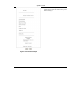
Figure 16 Printout Example
This screen shows how your custom statement
printout will look. Close the w
indow when you are
finished viewing it.
1
...
...
16
17
18
19
20
...
...
26