
Instruction Manual




7
SETUP FOR "QQMF JOS
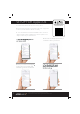
Download the Lithe Audio App from the App Store.
2. Ensure the Wi-Fi speaker is connected to the power supply and is
XYVRIHSRXLI0)(MRHMGEXSV[MPP¾EWLVIHWPS[P]
Press and hold the ‘Connection Reset Button’ for 5 seconds &
VIPIEWIXLI0)(MRHMGEXSV[MPP¾EWL+VIIRERHXLIWTIEOIVMWRS[
ready to connect to your Wi-Fi network.
Open the Wi-Fi setting menu on
your phone or tablet
5. Select the new "JS1MBZ speaker listed you
would like to add to your network
6. Select your network and change the
‘Speaker Name’ to something easily
MHIRXM½EFPIIK/MXGLIRERHGPMGO2I\X
4. The Lithe Audio Wi-Fi speaker
setup is now complete, return to
the Lithe Audio app
Image shows Apple iPhone but visuals may change from device to device.
Apple and iPhone are trademarks of Apple Inc., registered in the U.S. and other countries.
OPEN CAMERA & SCAN TO
DOWNLOAD THE APP