
Installation Guide




11
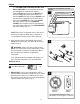
Wrap electrical tape (not included) around each
individual wire connector (CC) down to the wire as
shown in Fig. 2.
WARNING: Make sure no bare wire or wire
strands are visible after making connections. Place
green and white connections on opposite side of
box from the black and blue (if applicable)
connections.
Turn spliced/taped wires upward and gently push
wires and wire connectors (CC) into outlet box.
E3 Wire Connector x4
2.
Hardware Used
1
2
3
Dimmer
Switch
Speed
Switch
For illustrative purposes only--not
intended to cover all types of controls
IMPORTANT: Using a full range dimmer switch
(not included) to control fan speed will cause a loud
humming noise from fan. To reduce the risk of fire
or electrical shock, do NOT use a full range dimmer
switch to control fan speed. (Fig. 3)
3.
2
3
CC
CC
CC
CC
NOTE: Black wire is hot power for fan. Blue wire is
hot power for light kit. White wire is common for
fan and light kit. Green or bare wire is ground.
1C
FAN AND LIGHT CONTROLLED BY TWO WALL
SWITCHES
WHITE
BLACK (WALL SWITCH)
BLACK (WALL SWITCH FOR LIGHT)
GROUND/GREEN (BARE)
BLACK
BLUE
WHITE
FROM FAN
FAN
120 V Power
FROM
CEILING
GREEN
WHITE
GREEN
WIRING
1C. FAN AND LIGHT CONTROLLED BY TWO
WALL SWITCHES: If you intend to control the
fan and light with separate wall switches,
connect BLACK wire from fan to BLACK wire
from the independent wall switch for the fan.
Connect BLUE wire from fan to the BLACK wire
from the other independent wall switch for the
light. Connect WHITE wire from fan to WHITE
wire from ceiling. Connect all GROUND
(GREEN) wires together from fan (on downrod
(A) and mounting bracket (C)) to BARE/GREEN
wire from ceiling. (Fig. 1C)