
Installation Guide






page 7
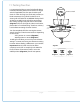
10. Light Kit Assembly (Optional).
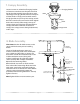
9. Switch Housing Assembly.
motor
housing
motor
housing
switch
housing
switch
housing
molex connections
blue
(or black)
black
white
white
switch housing
cap
light kit fitter
bulb
male plug
fitter plate screw
fitter plate
Remove 1 screw from fitter plate on
underside of motor and partially loosen the
other 2 screws. Align slotted holes in center
of switch housing with loosened screws in
fitter plate, allowing male plug from motor
housing to come through hole in middle of
switch housing. Twist switch housing to lock.
Re-insert screw that was removed and
secure all screws.
Connect male plug from motor housing to
female plug from switch housing, matching
up the colors on the male plug with the
colors on the female plug for correct fit.
Make sure that plugs connect completely.
Remove 3 screws from outer edge of switch
housing cap.
If you wish to use your fan WITH the light
kit, locate BLUE (or BLACK) and WHITE wires
in switch housing labeled FOR LIGHT. Remove
and discard plastic that holds these 2 wires
together.
Next, locate WHITE and BLACK wires in light
kit fitter.
Connect WHITE wire from switch housing
to WHITE wire from light kit fitter. Connect
BLUE (or BLACK) wire from switch housing to
BLACK wire from light kit fitter. Be sure molex
connections snap together completely.
Carefully arrange wiring inside switch
housing. Align holes on outer edge of switch
housing cap with holes in switch housing,
making sure to align the red dot on the inside
of the switch housing with the red dot on the
inside of the switch housing cap. Re-insert 3
screws that were previously removed and
securely tighten all screws with a Phillips
screwdriver.
Install 3 candelabra base 40 watt max. bulbs
(included).
Important: When replacing bulbs, please
allow bulbs and glass shade to cool down
before touching.
["Light Kit Assembly" continued on next
page.
female plug