
User manual

6
2. Installing the USB 2.0 Laptop Docking Station with Video
Before connecting USB 2.0 Laptop Docking Station with Video to your
computer, please install the necessary drivers first. Please use the driver CD of
USB 2.0 Laptop Docking Station with Video, the “USB 2.0 Laptop Docking
Station Driver Installer” will execute automatically. If the installer does not
start automatically, it might be “auto-run” option is disabled in your system,
please execute “AutoDrv.exe” manually.
This installation guide is written in accordance with different operation systems,
including Windows 98/98SE/ME, Windows 2000/XP/Vista. Please install USB
2.0 Laptop Docking Station with Video step by step by the following
instructions:
2.1. Execute Driver Setup Program
2.1.1. Win98/98SE/Me Driver Setup
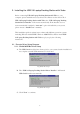
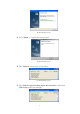
A. The USB-Lan driver files have been copied to your system, but the installation is
not complete yet until USB enumeration is done later.
Fig Win98-Me-Setup-1
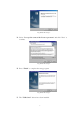
B. The “USB 2.0 Laptop Docking Station Driver Installer” will launch
USB-Serial installer automatically.
Fig Win98-Me-Setup-2
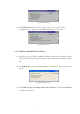
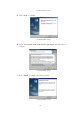
C. Click “Next” to continue.