
User manual





30
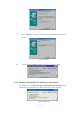
5. If you do not have a printer installed yet, click on Start, Settings, Printers
and choose Add Printer. The Add Printer Wizard will start and assist you
to install a new printer device. Select the printer manufacturer and model
name from the list provided by the wizard or use the printer driver diskette
came with your printer.
6. Windows will ask you which port the printer will be used, choose
USB001:(Virtual printer port to USB). (Ref. Fig.10)
Fig.10
2.7. Setting up the HyperTerminal with USB to serial port
1. Make sure that HyperTerminal is installed in your system. If not, please go
to Start, Settings, and Control Panel. Double click Add/Remove
Programs, choose Windows Setup page, Communications, click Details
button and enable HyperTerminal to install the program to your Windows
system.
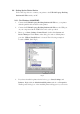
2. Go to Start, Settings, Control Panel, double click System, and click on
Device Manager. Check which COM port is located by USB to serial port.
(Ref. Fig.11)