
User manual





29
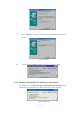
7. Windows will ask you which port the printer will be used, choose LPT2:
USB to Parallel Port. (Ref. Fig.8)
Follow the instructions to complete the installation. Run Print Test Page to
see if the printer is working without any problem
Fig.8
2.6.2. For Windows 2000/XP/Vista:
1. Connect the USB 2.0 Laptop Docking Station with Video to your printer
with the parallel cable and then turn on the printer.
2. Connect the USB 2.0 Laptop Docking Station with Video to the USB port
on your computer with the USB/VGA combo cable provided.
3. If you have installed a printer device before, go to Start, Settings, and
Printers. Right-click the default-installed printer and choose Properties.
The Properties dialog box of the installed printer will appear on your screen.
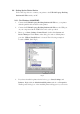
4. Click Ports folder tab and change the printer port to USB001: (Virtual
printer port for USB). (Ref. Fig.9)
Fig.9